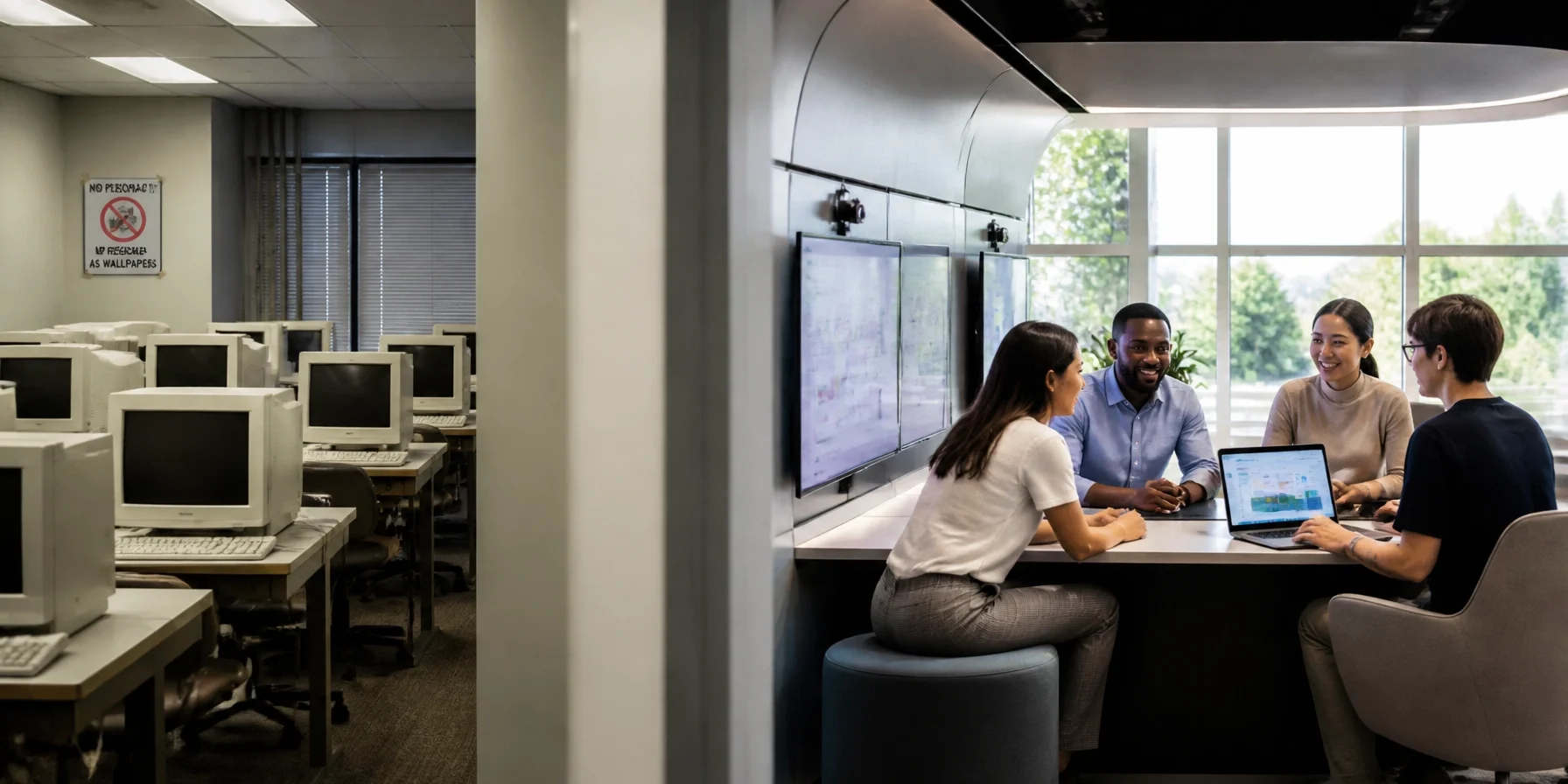
Picture the classic computer lab: rows of identical beige desktops, fluorescent lights buzzing overhead, cables coiled beneath the desks like they are preparing for retirement, and a sign warning students not to change the wallpaper.
Everyone sat facing forward. Everyone clicked quietly. And if someone needed help, they usually raised a hand and waited for an instructor to make the long journey from the front of the room.
That setup was practical for teaching typing, spreadsheets, and basic software skills. But modern technology careers do not work that way. Logistics teams coordinate in real time. Cybersecurity professionals investigate threats together. Content creators write, record, edit, and publish as a team.
The workplace is collaborative. The physical infrastructure should be, too.
What Is a Technology Pod?
A technology pod is a small, purpose-built workspace designed around a specific project, skill, or career pathway. It may include several workstations, shared screens, specialized software, secure networking, recording equipment, or simulation tools.
A pod is not merely a smaller computer lab. It is a miniature workplace.
In a logistics pod, learners might monitor shipments and adjust delivery routes. In a cybersecurity pod, they may investigate simulated attacks inside a protected network. In a content-creation pod, they can produce a podcast, livestream, or short video from concept to final edit.
The layout matters as much as the equipment. People face one another, share screens, divide responsibilities, and solve problems together. This makes it easier to learn from a teammate: and harder to pretend that staring intensely at a monitor counts as teamwork.
Research on active learning supports this approach. A widely cited study in the Proceedings of the National Academy of Sciences found that active learning improved student performance compared with traditional lecture-based instruction. Pods do not guarantee great teaching, but they make discussion, practice, and collaboration much easier to organize.
Why Old-School Computer Labs Are Showing Their Age
Traditional labs tend to be built around general-purpose computing. That can be useful, but it often creates an isolated learning experience: one person, one screen, one assignment, and perhaps one printer making an alarming noise in the corner.
Pods offer a more flexible alternative:
- Collaboration: Small teams can compare findings and make decisions together.
- Specialization: Different pods can support different career pathways.
- Flexibility: Equipment and layouts can change as technology changes.
- Better coaching: Instructors can move between groups and provide targeted help.
- Workplace realism: Learners practice the communication and role-sharing employers expect.
Guidance on career and technical education learning spaces similarly emphasizes adaptable environments connected to real industry tasks.
The central idea is simple: students should not only learn how to operate technology. They should learn how to use it with other people to accomplish something meaningful.
Logistics Pods: When the Shipment Does Not Go According to Plan
Imagine a class managing a simulated distribution network. At 9:15 a.m., everything looks normal. Inventory is balanced, routes are efficient, and nobody has used the phrase “unexpected delay.”
Then a major shipment is disrupted.
One team member checks inventory. Another reviews alternative transportation routes. A third estimates cost and delivery impact. A fourth communicates the revised plan to a mock customer.
That scenario teaches far more than clicking through a logistics dashboard. It shows how a delayed shipment can affect warehouses, staffing, production schedules, customer relationships, and budgets.
A logistics pod can include shared displays, inventory software, route-planning tools, and real-time or simulated tracking information. Learners practice working as planners, analysts, dispatchers, and operations managers.
They also discover an important truth: logistics is not just about moving boxes. It is about making clear decisions when the boxes are late, the weather is unhelpful, and everyone wants an update immediately.

Cybersecurity Pods: Safe Practice for Serious Problems
Cybersecurity training presents a special challenge. Learners need realistic practice, but experimenting on a live school or business network is generally frowned upon: and for good reason.
A cybersecurity pod can provide a controlled environment, often called a sandbox, where students investigate simulated vulnerabilities without affecting real systems.
In one exercise, a red team attempts to identify weaknesses while a blue team monitors activity and responds to the incident. A student on the red team may find an overlooked access point. The blue team notices unusual activity, checks logs, isolates the affected system, and documents what happened.
The most valuable lesson may come afterward, when a student learns more from a teammate’s explanation than from another hour of reading definitions on a screen.
This format develops technical skills such as monitoring and incident analysis, but it also builds communication, documentation, and calm decision-making. Those skills matter in security operations centers, IT departments, government agencies, and nearly every organization connected to the internet: which is to say, nearly every organization.

Content-Creation Pods: From Consumer to Producer
Content-creation pods turn a quiet corner into a compact production studio. A typical setup might include cameras, microphones, lighting, acoustic panels, headphones, and editing workstations.
Consider a student team producing a short interview series. One person researches and writes questions. Another operates the camera. A third monitors audio. A fourth edits the footage and prepares clips for social media.
The team quickly learns that a good microphone matters, background noise has no mercy, and “we can fix it in post” is sometimes an optimistic theory rather than a plan.
These pods support podcasts, video essays, livestreams, public-service announcements, training content, and digital marketing projects. Learners develop technical production skills alongside storytelling, planning, copyright awareness, and audience analysis.

How to Start Small
A pod-based approach does not require rebuilding an entire facility. Organizations can begin with a practical pilot:
- Identify local workforce needs. Speak with employers, instructors, and workforce partners.
- Choose one pathway. Start with logistics, cybersecurity, or content creation.
- Design around a project. Select equipment based on what learners must accomplish.
- Measure results. Track participation, teamwork, project quality, and skill development.
- Expand gradually. Use the pilot’s lessons to guide future investment.
Pods are not a magic replacement for every traditional lab. General computer access will remain useful. However, career education is moving toward flexible, specialized spaces that resemble actual workplaces.
The future computer lab may contain fewer rows and more conversations. That is a promising change. When learners can practice solving disruptions, defending systems, and producing original work together, physical infrastructure becomes part of the lesson.
And the next generation will not just know where the computers are. They will know what to do with them.